摘要: 本教程将教你如何使用 JavaScript arc() 方法绘制圆形弧线。
JavaScript arc() 方法简介
arc() 是 Canvas 2D API 的一个方法。arc() 方法允许你绘制圆形弧线。
以下是 arc() 方法的语法
ctx.arc(x, y, radius, startAngle, endAngle [, antiClockwise])Code language: CSS (css)arc() 方法绘制以 (x,y) 为中心,半径为 radius 的圆形弧线。
弧线将从 startAngle 开始,在 endAngle 结束。startAngle 和 endAngle 都以弧度表示。
由于 π 弧度 = 180 度,1 弧度约为 π/ 180 度。一个完整的圆周是 360 度,即 2 * π 弧度。在 JavaScript 中,π = Math.PI
默认情况下,路径按顺时针方向移动。如果你将 antiClockwise 设置为 false,路径将沿相反的时钟方向移动。
在调用 arc() 方法之前,你需要调用 beginPath() 开始一个新的路径。
在调用 arc() 方法之后,你可以使用 strokeStyle 通过调用 stroke() 方法来描边弧线。此外,你也可以使用 fillStyle 通过调用 fill() 方法来填充弧线。
要设置弧线的宽度,可以使用 lineWidth 属性。例如
ctx.lineWidth = 5;JavaScript 弧形示例
让我们看一些使用 JavaScript arc() 方法绘制弧线的示例。
绘制圆形
以下 index.html 包含一个 canvas 元素
<!DOCTYPE html>
<html lang="en">

<head>
    <meta charset="UTF-8">
    <meta name="viewport" content="width=device-width, initial-scale=1.0">
    <title>JavaScript arc Demo</title>
    <link rel="stylesheet" href="css/style.css">
</head>

<body>

    <h1>JavaScript arc Demo</h1>

    <canvas id="canvas" height="400" width="500">
    </canvas>

    <script src="js/app.js"></script>
</body>
</html>Code language: HTML, XML (xml)
以下代码使用 arc() 方法在画布的中心绘制一个圆形
const canvas = document.querySelector('#canvas');

if (canvas.getContext) {
    const ctx = canvas.getContext('2d');

    ctx.strokeStyle = 'red';
    ctx.fillStyle = 'rgba(255,0,0,0.1)';
    ctx.lineWidth = 5;

    ctx.beginPath();
    ctx.arc(canvas.width / 2, canvas.height / 2, 100, 0, 2 * Math.PI);

    ctx.stroke();
    ctx.fill();
}Code language: JavaScript (javascript)
工作原理
- 首先,使用 querySelector() 方法选择画布。
- 接下来,如果 canvas API 支持,获取 2D 绘图上下文。
- 然后,使用 2D 绘图上下文的
strokeStyle、fillStyle和lineWidth属性设置描边、填充和线宽。 - 之后,使用
beginPath()和arc()方法在画布的中心绘制半径为 100 像素的圆形。圆形是一个起始角度为 0、结束角度为2 * Math.PI的弧线。 - 最后,调用
stroke()和fill()方法来应用描边和填充。
以下图片显示了输出结果
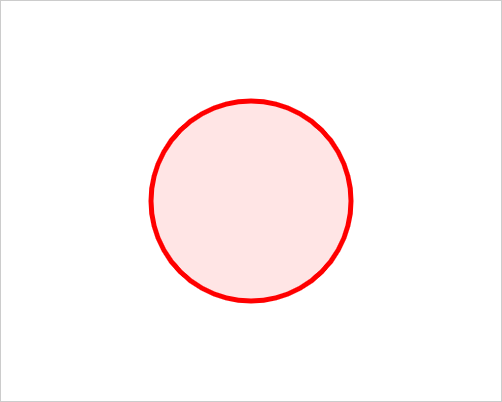
以及 实时页面的链接。
以下代码绘制了 6 个半径相同的弧线。所有弧线的起始角度都为 0
const canvas = document.querySelector('#canvas');

if (canvas.getContext) {

    const ctx = canvas.getContext('2d');

    ctx.strokeStyle = 'green';
    ctx.lineWidth = 2;

    const x = 40,
        y = canvas.height / 2,
        space = 10,
        radius = 30,
        arcCount = 6;

    for (let i = 0; i < arcCount; i++) {
        ctx.beginPath();
        ctx.arc(x + i * (radius * 2 + space), y, radius, 0, (i + 1) * (2 * Math.PI) / arcCount, false);
        ctx.stroke();
    }
}Code language: JavaScript (javascript)
输出结果
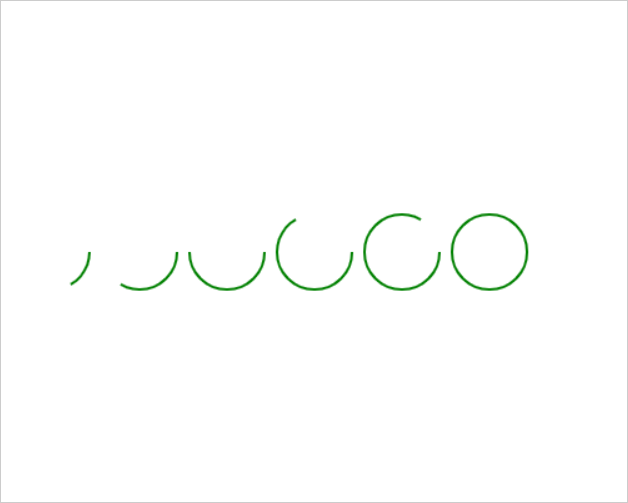
总结
- 使用 JavaScript
arc()方法绘制弧线。 - 使用
beginPath()方法开始新的弧线。使用stroke()和/或fill()方法来描边和填充弧线。
本教程是否有帮助?

